How to Read a COA — 2025 Edition

Updated: August 2025
Not sure what you're looking at? This is your 90-second decoder for any cannabis COA (Certificate of Analysis) — what to check first, what "PASS" really means, and quick red flags.
TL;DR: Match the batch ID, confirm safety panels = PASS, glance at potency & terpenes, and you're done.
Step 1 — Match the product to the COA (10 seconds)
Scan the QR on your box with your phone camera.
On the COA page, confirm:
- Brand & product name match what's in your hand
- Batch/lot ID is the same as your package
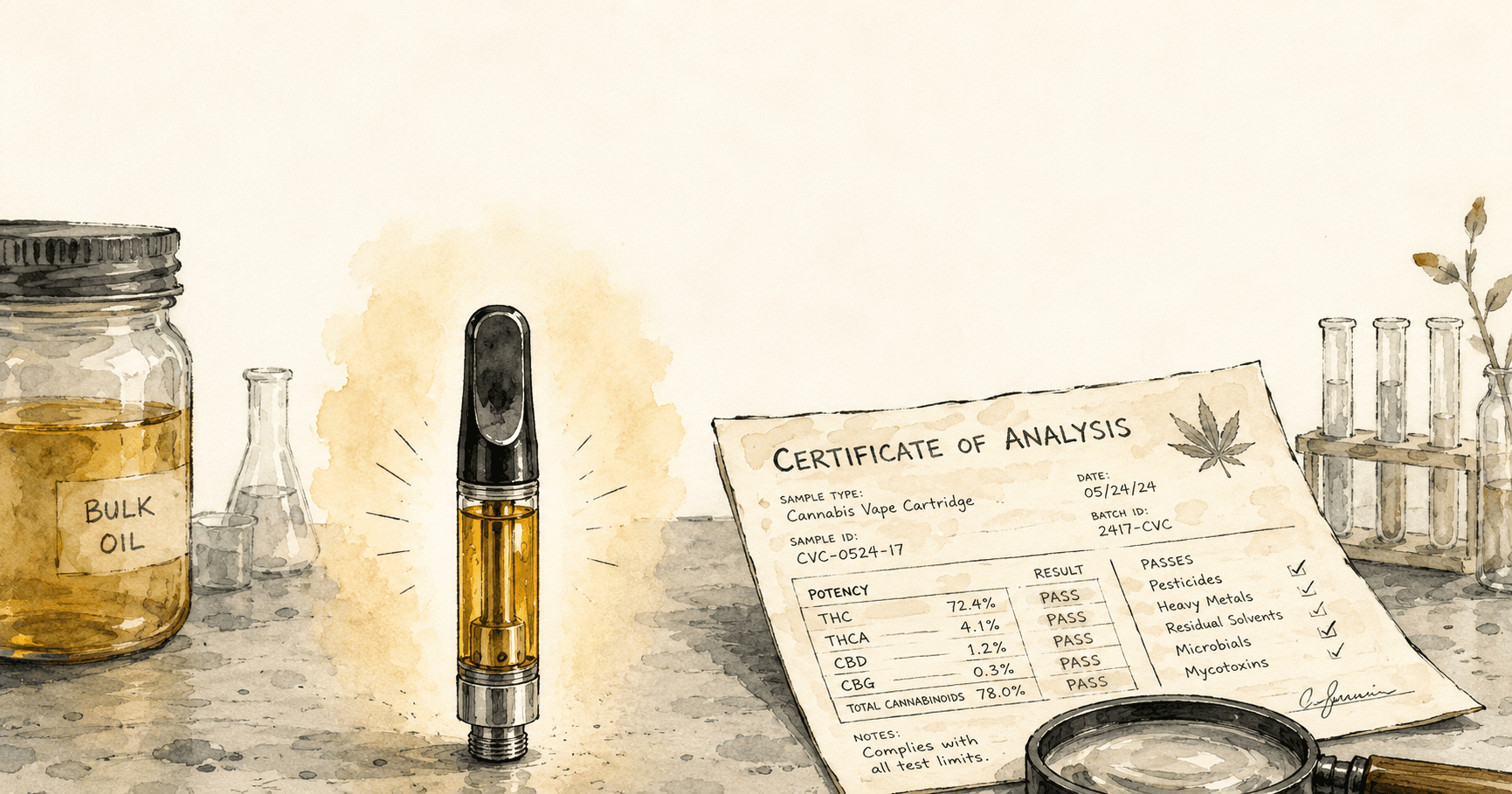
- Sample type = finished product (not raw bulk oil)
- Dates (sample collected / results reported) look recent for your purchase
If the batch/lot ID doesn't match, treat it like a mismatch — find the right COA first.
Step 2 — Safety panels = PASS (30 seconds)
You'll typically see these panels. A clean COA shows PASS across all of them:
- Pesticides (Category I & II)
- Heavy Metals (lead, arsenic, cadmium, mercury)
- Residual Solvents (for extracts/oils)
- Microbials (like salmonella, E. coli)
- Mycotoxins (aflatoxins/ochratoxin A)
Skim the "Result" column — PASS is what matters. (Individual numbers are measured in very small units like ppm or ppb; the lab compares them to state limits so you don't have to.)
Step 3 — Potency math (20 seconds)
Potency is usually shown as % by weight and/or mg/g.
Vape carts (most common):
- mg in the cart = (mg/g) x net grams of oil
- Example: 880 mg/g in a 1.0 g cart = roughly 880 mg total cannabinoids
THC vs. Total Cannabinoids:
- Total THC = THC + THCa (labs convert acids to an equivalent).
- Total Cannabinoids includes THC, CBD, minor cannabinoids, etc.
Expect minor variation across lots — match the batch to know what you actually have.
High numbers aren't everything. Flavor and feel are majorly shaped by terpenes.
Step 4 — Terpenes = flavor & feel
- Look for a Terpene Profile table (often % or mg/g).
- Common standouts: limonene, myrcene, caryophyllene, pinene, linalool.
- A strong, balanced terp profile often correlates with better aroma, flavor, and experience.
Quick Red Flags (30 seconds)
- No batch/lot ID or it doesn't match your package.
- Old COA being reused for a new product or different size.
- Only potency shown (no safety panels).
- Suspicious hosting (random file shares) instead of a lab or brand portal.
- "ND" everywhere (non-detect) but no "PASS/FAIL" summary — verify with the brand.
What if the QR doesn't work?
- Double-check you have good signal and try again.
- Visit the brand's COA/Transparency page and search your batch/lot ID.
- Ask the retailer for help locating the COA for your exact batch.
Glossary (plain-English)
- COA: Lab report proving a batch passed safety testing and listing potency/terpenes.
- Batch/Lot ID: The unique code for your specific production run — must match.
- PASS: The analyte is below the legal safety limit (good).
- mg/g: Milligrams per gram. For a 1.0 g cart, mg/g = roughly total mg in the cart.
- ppm / ppb: Parts per million/billion — tiny measurement units used in safety testing.
FAQ
Do COAs expire?
Not formally, but they're batch-specific. If your package's batch ID isn't on the COA, it's not the right report.
Why doesn't my label % match the COA exactly?
Small differences can happen across labs or between raw oil and finished goods. Always match by batch ID — that's the authoritative number.
Where are the terpenes on some reports?
Some labs split them into a separate "Terpene Profile" page/tab. If you don't see it, search within the COA or look for a second report.
Can I trust a screenshot?
Always prefer the live lab link from the QR or the brand's COA portal. Screenshots can be outdated.
Want more cannabis intel?
Join The Dealers Diary — weekly strain spotlights, industry news, and insider access.
Subscribe Free